ATLANTIC Group Employment Intranet E-Mail Us Contact Us High Definition Video Conferencing ATLANTIC Convergence ATLANTIC Telecoms ATLANTIC Transmission ATLANTIC Broadband


EasyCommission


Save time, more… ®

Atlantic Group provides TELEcommunication equipment and services that are easy to use, reliable and have a very high performance to cost ratio.

We live in an ever-changing, high speed and highly integrated environment and thus we provide our customers with solutions that can be implemented in a phased approach. We offer effective rental agreements for telecommunication equipment and services which allow for future equipment upgrades, thus gaining the greatest commercial effectiveness for our customers.

Our value proposition is to reduce operating costs and to save valuable time for our customers. In today’s world this gained time can be used to gain a competitive advantage or simply have more fun time in their own lives.


Disclaimer:


Atlantic Holdings, Atlantic Telecom Systems, Atlantic Convergence, Atlantic Video Solutions disclaim all liability for any loss, damage, injury or expense however caused, arising from the use of or reliance upon, in any manner, the information provided throughout this web site and does not warrant the truth, accuracy or completeness of the information provided. The onus rest with the user to verify the accuracy of any information obtained via this web site.


© Copyright 2013 Atlantic Group

Keywords: High Definition Video Conferencing Systems - LifeSize, Toshiba Digital PBX PABX Telephone Systems, VOIP, Broadband Internet Access ISP, Email, Telecommunications Carrier Equipment Supplier Wholesaler Importers and Distributors. Strata


Strata CIX family - Flexible and feature-rich IP telephony

The Strata CIX family consists of feature-rich, robust, reliable and easy-to-use communication platforms which can be configured according to the size and individual needs of your business.

Key benefits of Strata CIX:

  • Built-in scalability and upgrade paths ensuring easy migration to new technology of a higher capacity system.
  • Common parts ensure protection of your investment.
  • Common functionality allowing organisations of all sizes to enjoy the same rich set of features.
  • Enhanced management information helping to improve performance and operational efficiency.
  • Ultimately flexible, ensuring that your business growth can be easily and cost-effectively reflected in your communication solution.
  • Easily evaluate incoming and outgoing call patterns, restrict access to long-distance calls, connect seamlessly to high-speed digital services or take advantage of IP telephony.
  • Ensure that calls are automatically routed over the least costly trunk line or long-distance carrier.
  • Toshiba engineering innovations ensure you enjoy reliability superior to that of any similar-sized telephone system.

Use the table below to find the right Strata CIX communication platform for you, and then click on the relevant option for more information.  You can also review the key functionality available in all of our Strata CIX systems.

Strata CIX40 Strata CIX100

Strata CIX200

Strata CIX670

Number of ports

41

112

192

672

Number of extensions

Up to 24

Up to 72

Up to 160

Up to 560

Technology

Digital or Hybrid-IP

Digital, Hybrid-IP or Pure-IP

Digital, Hybrid-IP or Pure-IP

Digital, Hybrid-IP or Pure-IP

Format

Wall mounted

Wall mounted

Rack mounted

Wall, floor or rack mounted

Our Strata CIX communication platforms are complimented by a portfolio of elegant and classically-styled digital featurephones and IP telephony tools that require minimal training, are easy-to-use, robust and reliable to ensure maximum business continuity.

Toshiba’s portfolio contains a wide choice of featurephones to meet your specific requirements, including a low-cost entry-level digital option, through to the most sophisticated large display IP featurephone.  You can therefore select the most appropriate featurephones for the individual requirements of your users, increasing office efficiency in a variety of ways.

Key benefits of Strata featurephones:

Fully-featured, flexible and reliable IP telephony solutions, with a price to make Voice over IP (VoIP) accessible to all sizes of organisation.

Supporting smarter business communications, IP telephony converts voice into data packets which can be transferred over your existing data network, delivering key business benefits:

Key benefits of IP telephony: 

IP telephony can also come in two flavours, either as a hybrid system which incorporates digital as well as IP handsets, or pure IP which only uses IP.  Both of these options deliver their own set of benefits:

Benefits of hybrid IP telephony Benefits of pure IP telephony
  • Allows deployment of IP devices where required.
  • Remote offices can effectively be called for free.
  • Provides guaranteed Quality of Service (QoS) for head office-based staff.
  • Minimises business risk by providing redundancy options should the network fail.
  • Reduction in costs of calls between head and branch offices.
  • Reduces bandwidth for internal calls in branch offices, through peer-to-peer technology.
  • Cheaper and quicker to establish new or temporary offices, or link buildings together.
  • Peer-to-peer technology ensures best possible QoS for IP telephony.

IP Telephony, however, will not provide sound business benefits for all organisations.  For this reason, Toshiba's Strata CIX family can be configured to offer the best solution for you today, and easily and cost-effectively amended to implement new technology when it's right for your business. 

Core office digital telephony solutions

Reliable and feature-rich digital telephony solutions with ultimate flexibility, allowing you to implement IP telephony when it's right for your business, without having to completely replace your telephone system.

Our Strata CIX family is ideal for organisations who currently do not see a requirement for IP telephony, or do not have the budget to invest in a new communications infrastructure.  With the ability to install a traditional digital solution today, and then implement IP telephony easily and cost-effectively in the future, Strata CIX allows organisations to take advantage of other technology such as call routing, or Computer Telephony Integration (CTI) without having to wait to implement IP.  What's more, when the time is right to move to IP, you will not have to replace your existing solution, thus protecting the investment you make today.

Benefits of digital telephony

  • Ideal for single site companies with office-based staff
  • Provides guaranteed Quality of Service (QoS) for all staff
  • Strata CIX solutions allow IP telephony to be implemented when required

Our Strata CIX family offers maximum flexibility to our customers, allowing you to implement IP telephony when it's right for your business, whilst protecting your investment. 

Link your computer and telephony networks together

CTI allows you to link your computer systems with your telephony network to create a telephony solution that can revolutionise the way you interact with customers, business partners and personnel.

Using CTI it is possibe for example, to automatically fetch records from a database or CRM system before a call is connected, providing the agent with all the information they need to service the caller.  When calls are received, providing the caller's records are held, their details can 'pop' on the PC screen on the desktop.

This means that your staff can then answer a call with a personalised greeting, offer a more efficient and personal service or even identify possible cross-selling opportunites that could result in additional revenue for your business.  With IP telephony, this functionality can be extended to your remote or home workers.

Key benefits

  • Calls are dealt with more efficiently, leading to increased customer satisfaction
  • Customer-facing teams can address callers by name and have all their details in front of them before the call is connected, increasing customer service levels
  • You can minimise the time spent gathering information and therefore shorten the length of the call saving costs and increasing employee productivity
  • Dialling, answering, transferring and placing calls on hold can all be managed on-screen for increased productivity
  • Databases created for other purposes can be used as directories, allowing your customer-facing teams or contact centre agents to dial numbers and send instant messages directly from their PC
  • Strata communication platforms designed to support ‘third party’ CTI capabilities to offer CTI to users across the entire network, without the need for a physical connection at each desktop
  • Allows your organisation to provide a better, faster and more personal service

Toshiba offer a range of CTI options using two main software suites; NetPhone and SmartApplications that are allow calls to be dialled, answered, transferred and placed on hold from a desktop PC or laptop.

NetPhone
NetPhone allows the dialing, answering, transferring and placing on hold of all calls to be managed on-screen, and supports screen popping of caller details. It allows information held in a back office data base to be used as directories, allowing your users to dial numbers directly from their PC, take call notes, send instant text messages and dial a phone number from any application.

The sophisticated management offered by Net Phone can greatly improve the efficiency and productivity of contact centre agents or any members of staff who receive and make a lot of calls. It is a high quality, excellent-value-for-money productivity tool that eliminates the need to switch from computer to telephone for call processing functions.

SmartApplications
SmartApplications consists of two powerful products aimed at enhancing productivity; SmartPhone and SmartConnect.
SmartPhone is a powerful, fully-featured PC-based ‘soft phone’ that provides every employee with their own personalised productivity tool for managing their communications, and making maximum use of their time on the phone.

Working with SmartPhone, SmartConnect integrates to over 100 business applications, including many common CRM systems. Enabling features such as screen popping to back office databases, SmartConnect can also utilise the connection to your contact database to create a clear and concise address book which agents can use to simply enter the contact’s name and click to dial the number that is presented.  SmartConnect also allows customer information to be transferred with the call to ensure that information does not have to be repeated by the caller.

Manage inbound calls more efficiently

Call routing solutions that enable you to manage customer and internal calls more efficiently and improve the way your company is perceived.

In today's competitive environment, the ability to manage customer and internal voice communications effectively is increasingly critical.  Understandably, callers want their calls to be answered quickly and dealt with efficiently.  They do not want to be held in a long queue, and passed from department to department before a question is answered.  For this reason, Toshiba has a range of call routing solutions that are designed to ensure that all inbound calls are handled as efficiently as possible including:

Flexible Call Routing - Route calls based on caller ID, DDI number dialled, balanced call count, preferred agent treatment, agent priority, or time-of-day, day-of-week or, with Call Router, day-of-year, providing maximum flexibility. 

Intelligent Queue Announcements - If all agents are busy, calls to an ACD group are queued to wait for the first available agent in the group.  While waiting, callers hear programmed intelligent announcements or music, encouraging them to remain on hold.  This gives you an opportunity to provide valuable information while they're waiting.

Interactive Call Announcements - When a customers calls into the organisation, there is an opportunity to collect important information before the call is put through.  This saves both the customer and agent time, increasing efficiency and customer satisfaction.

Priority Queuing - Enabling higher-priority calls to be answered sooner than low-priority calls, ACD calls can be tagged with a priority number before they are placed into the ACD group queue.  The priority number assigned to the call then determines where the call is placed in the queue.

Multiple Call Queues - You can set up multiple call queues for differing services or sales promotions, each with an individual announcement.  If callers are handled more efficiently and personally, this improves customer satisfaction which in turn leads to increased loyalty and revenue.

Call Back Service - Rather than making callers wait in a queue, a call back service can be offered that allows them to leave a request to be called back.  Call backs can be prioritised in order of importance to the business, urgency or convenience, and agents can ensure that they are fully armed with background information to help them answer the query quickly and efficiently.

Preferred Agent - Skill-based Call Routing - Using CLI, it is possible to route callers to agents who they have dealt with before.  If that agent is busy or unavailable, the caller can be held in a queue until the chosen agent is free, routed to another agent, or leave a message to be called back.  Calls can also be routed to agents based on their skills and knowledge to ensure that the customer's query is answered as effectively as possible.

Interactive Voice Response (IVR) - IVR allows you to provide callers with a 'self-service option', which can make a dramatic difference to the way a call is handled, and how your company is perceived.

Recording telephone conversations

Organisations today require the ability to record calls for a variety of purposes including, security, transactional analysis, quality assurance, staff training and performance monitoring. 

Toshiba's call recording solutions allow you to securely and efficiently record inbound and outbound telephone calls, which can then be used for training purposes with a view to improving call handling techniques.  Easy to set up and use, our call recording solutions include an entry level option as well as a high specification corporate option.

Key benefits

  • Retain a record of exactly what was said, when and by whom, to effectively resolve customer disputes. 
  • Provide valuable for staff training, showing examples of good and bad call handling.
  • Enhance customer service by identifying staff that require additional training.
  • Record telephone orders to ensure the validity of order and delivery information.
  • Modular and flexible options available, allowing you to grow the solution as the needs of your organisation change.
  • Easy to use configuration, operation and archiving, ensuring you can easily find what you're looking for.

Simplify the administration of your telephony platform

Operating over a LAN or the Internet for remote operation, our browser-based eManager and My Phone Manager software allows authorised personnel to make simple system changes, such as moves, adds and changes with literally just a few mouse clicks.

e-Manager provides an easy-to-use interface to administer and maintain the Strata CIX systems. 

Key benefits:

  • Powerful, browser-based administration tool for easy access anywhere.
  • Easy growth through simple adds, moves and changes.
  • Local/remote maintenance with backup to smart media.
  • Four customisable access levels, with the ability to add more as required to ensure only qualified personnel make changes.
  • Configuration wizards to speed installation and maintenance.

My Phone Manager allows individual users to quickly and easily configure their own featurephone for the functions that matter to them.

Key benefits:

  • Empower users to get the best out of their featurephones.
  • Web interface allows easy confirguration of basic station options, call forwarding, Do Not Disturb (DND), speed dials, etc.
  • Helps reduce IT administration tasks as users can perform basic functions themselves.
  • Access can also be given to managers or supervisors to, for example, forward calls to voicemail if an employee is off sick.

VOIP soft phone

Make and receive calls from your laptop or PC with all the functionality that you'd expect from a Toshiba feature phone.

Toshiba's IP series of featurephones includes an IP Soft Phone which allows users to use their laptop or PC as a fully functioning IP phone.  The IP Soft Phone is particularly useful for individuals who may work in a variety of locations including branch offices, or even at home.

The IP Soft Phone is equipped with the following as standard:

  • 4 soft keys.
  • 10 flexible buttons, 9 of which can be customised.
  • Voice switch to control quality when using headsets.
  • Screen popping customisable option.
  • Customisable mode of answer.
  • Live all program display.
  • Hot dialling.
  • Call key.
  • Conference/transfer key.
  • Redial key.
  • Hold button.
  • Mute key.
  • Voicemail key.
  • Message waiting indication.
  • Volume control keys.
  • Directory dialling.
  • Call log.


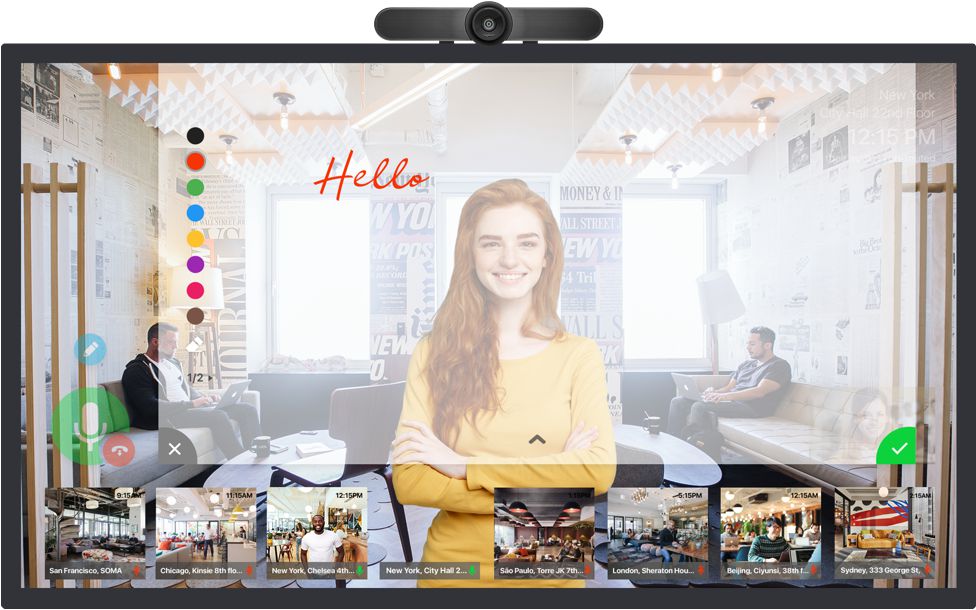
Experience the Difference High definition video communications from LifeSize® elevates human interaction across distances to an entirely new level. Imagine seeing everything vividly, hearing everyone clearly and enjoying every moment flawlessly! Through innovative, next generation videoconferencing technology, the LifeSize high definition product suite delivers superior video quality, exceptional audio coverage and seamless manageability. LifeSize users realize better quality at any bandwidth and, with the very best price-to-performance value available on the market, anyone with dispersed colleagues and operations can now effectively share important information and valuable insights. Experience the difference with LifeSize. Better Quality at Any Bandwidth By delivering nearly ten times the quality of existing videoconferencing systems, users will experience a completely new paradigm in face-to-face video communications.

High definition (1280 x 720 pixels at 30 frames per second) video resolution will make participants appear true-to-size. And with advanced processing capabilities, LifeSize Room provides better video at any bandwidth.

High Definition – The Way Video Communications Was Meant to Be

Critical Success Factors for Technology Decision Makers

If seeing is believing, then the video conferencing experience of the past has always been something less than believable. Despite boastful claims that the video was “just as good as being there” and would allow us to “extend the conference room table 10,000 miles,” the truth was always something short of expectations. The quality of video conferencing was limited. Viewed in low resolution, participants always have appeared blurred and murky. While organizations have gone to great lengths to modify rooms and lighting to create the best possible quality, they have done so with limited success and at great expense.

Now, the opportunity to make video communications deeply compelling and true-to life is about to be seized. This promises to be a consequential leap in technological innovation, but it also represents an important advance in terms of productivity in an era of global collaboration and communication.

Why High Definition (HD) is Important

Why are advances in video communications technology important? Such innovations matter because the productive value of interactive video is inextricably bound to the technology itself. After all, no one would watch television if it was difficult to turn on and had a low quality picture. Similarly, the reluctance to actively use video communications is linked to poor image resolution, unimpressive sound quality, and user complexity. As interactive video becomes a vivid, high definition experience, it will also become an actively used and highly productive form of communication.

Advances in video communications technology represent immediate savings to the bottom line as travel time and costs are reduced. But video communications and other rich media collaboration solutions also “provide better ways to communicate and work,” according to a report by Wainhouse Research. “New tools provide ways for knowledge workers not just to exchange information, but to interact productively.”

New technology promises resolution that offers three times (3X) the resolution of standard television (NTSC) resolution and ten times (10X) the resolution of the conventional video conferencing systems (FCIF) available over the past 15-20 years. With the introduction high definition video, powerful new camera designs, spatial audio, and new user interface approaches, video communications is poised for dramatic advances from a technical perspective.

To maximize business and technical benefits of video communications, technology decision-makers must recognize key criteria and consider how different vendors stack up against these criteria. While this paper makes the case for next generation products from LifeSize Communications, readers are encouraged to compare and consider the different options in the industry to ensure they are making their best decision.

Critical Success Factors when Assessing High Definition Video

Communications and Traditional FCIF Systems

Several key criteria for assessing video conferencing technology are explored in this paper. While the standard criteria discussed here certainly relate to “quality” from a technical standpoint, they also are linked to the “productivity” of video calls as a means of conducting effective communication.

Herein, we recognize the technical strength from the perspective of producing a realistic experience (one that is vivid and true-to-life) and an intuitive experience (one that emphasizes simplicity and ease of use). Among the key assessment criteria discussed here are: visual realism; acoustic realism; and usage simplicity.

VISUAL REALISM.

Video communications technology has reached levels that simply weren’t possible a few years ago. Today, it’s possible to provide a high definition visual experience in a cost-effective way. Reaching that objective, however, requires us to consider how compelling, high definition video communications are both generated (video resolution) and perceived (visual acuity).

Video Resolution. In order to provide video resolution that generates a compelling, true-to-life experience, it is necessary for high definition video solutions to incorporate and encompass several recent advancements in the video communications field:

  • Architecture. As suggested in Moore’s Law, there are advances in processing power that continue to double every 18 months. Today’s video conferencing systems are limited to providing FCIF (352 x 288) resolution video at 15-30FPS due to computing limitations or MIPS available in the architecture of these systems. Video communications is a processor intensive application. New advances in processor technology enable new compression/decompression (CODEC) architectures that provide high definition video communications at a resolution of 1,280 x 720, 30 FPS which is 10X FCIF quality.

  • Bandwidth. In order to achieve higher resolution video communications, some early adopters have gone to great lengths to provide uncompressed high definition video using MPEG devices and cobbled together components. The limitation of these efforts is that they require significant amounts of bandwidth – upwards of 2-5Gbps, according to USC’s Integrated Media Systems Center (http://imsc.usc.edu/research/ ). There are very exciting applications available for this level of video communications but the bandwidth required and unsupported and unreliable configurations would severely limit usage by mainstream users.

  • While many of today’s video conferencing networks operate at bandwidths of 384Kbps to 768Kbps, this has been primarily due to diminishing returns of quality associated with applying additional bandwidth. In fact, most organizations have chosen to use this bandwidth for data applications due to the lack of benefit linked to using more bandwidth with a FCIF system. With LifeSize, users will experience improved quality at all bandwidths but will achieve full high definition resolution (10X FCIF) by utilizing 1Mbps+ of bandwidth. In recent years, cost effective bandwidth and network convergence have become widely accessible in the enterprise and other organizations such as universities and government institutions.

  • Standards. When exploring investments in video communications, it is also important to consider the linkage between a particular solution and industry standards. Adherence to industry standards protects an investment by ensuring compatibility with existing systems. Meanwhile, breakthrough standards – such as the newly released H.264 standard – make it possible to take high definition video communications to new levels. H.264 is a culmination of 10 years of work in the industry to create the very best video compression algorithm, extended to include high definition resolutions. This standard is 2-3X better than compression algorithms that the industry has previously used. Importantly, it is also backward compatible. As a standard, it is crucial to provide interoperability for systems to expand the growth and communication of multi-vendor systems. In it’s new video communication systems, LifeSize has embraced this standard and has fully leveraged its capabilities.

  • Cameras. High definition cameras have primarily been available for the broadcast market or for digital camcorders. In the case of broadcast equipment, the cameras are not cost effective for mainstream video communications. On the other hand, digital camcorders do not provide the quality needed for interactive video conferencing systems. One factor making high definition interactive video possible is the availability of reasonably priced image sensors that are driven by the digital camera market. LifeSize has internally developed a cost effective high definition camera using commercially available image sensors and has developed software to make the camera appropriate for the challenges of video communications. Such developments make it possible to cost-effectively address exposure and backlight compensation challenges (see sidebar) to generate a vivid and compelling picture.

Visual Acuity.

The human eye has a certain well known and measurable level of visual acuity. If you look at an object, you can resolve the detail only to certain limits – like the numbers on an eye chart. In the viewing of a video image, what is important is producing as much resolution as the eye can resolve. This is the standard to measure against: visual acuity. Added resolution is unnecessary because the eye cannot see it. If the video resolution is below the eye’s, the image will appear to be filled with pixels. In other words, there’s a certain optimal resolution in relation to visual acuity. LifeSize achieves that optimal resolution and provides a “large window” view of the participants on the far end of the conference call. With a 50 inch, plasma screen (1280 x 720 pixels), the optimal viewing distance based on the human visual system is about 10 feet. The screen image looks as good as if someone is standing in the room. The eye can’t tell the difference from a resolution standpoint.

CAPTURING THE HIGH DEFINITION VIDEO CONFERENCE IMAGE:

Advances in Exposure and Backlight Compensation Most video conferencing systems today rely on cameras that have a manual setting for “backlight compensation” – which is an adjustment in relation to light and dark lighting.

Unfortunately, the setting – in standard practice – is rarely changed to match the light levels in a room. As a result, participants see images of people on their screen that tend to be too light or too dark. If there is a background of bright daylight outside, the participants in the call may appear dark. If the video conference occurs at night, the bright white lights in a room may often wash them out. There are many possible causes for the person to be improperly exposed. The poor exposure, however, is distracting to the participants.

While most video conferencing systems depend on the participant to adjust the camera setting to reflect lighting conditions, few of us bother. We merely learn to live with the exposure problems. LifeSize, however, has built “automatic backlight compensation” into its high-resolution cameras. The feature automatically shifts the exposure to ensure the lighting matches the circumstances and the participants are well lit.

LifeSize addressed this challenge by focusing on the human participants in the exposure. Compelling video communication, after all, is mostly about capturing the people who are participating. LifeSize’s system has an automatic patent-pending, skin detection system. It weights human skin – no matter the color or tone – higher than anything else in the frame. This has proved a powerful means of ensuring backlight compensation is automatically and effectively managed.

People appear to be true-to-life, which is an important factor in making the experience as credible and compelling as possible.

But consider the “optimal” viewing distance for a FCIF (352 x 280 pixels) image. It is 32 feet away. That’s the distance at which the visual acuity of the eye matches the resolution of the image. Rather than provide a full-screen view, video conferencing must shrink the image to avoid projecting a blurry image with a standard room.

By projecting a high definition image onto a large window, LifeSize enables the video conference participant to clearly see the participants on the far-end without moving a camera around. Not only is the “window” matched to the eye’s resolution limit, the person you are seeing is true-to-life. If you have enough of a view, then you just move your eye to look at whoever you want to see. The larger the participants on the screen, the more “real” the experience seems.

For video conference calls within an executive office, LifeSize has designed an integrated system for a 17- inch screen with a 16:9 format. The optimal viewing distance at which the image matches the eye’s visual acuity is 3.3 feet. Contrast that with conventional systems on the market, which use the FCIF standard and therefore, would require the participant to be 10 feet away from the monitor to obtain optimal resolution.

ACOUSTIC REALISM. While audio is often an overlooked aspect of the video conference experience, it is critical to recognize how vital acoustic quality is to the overall perception of the experience itself. This factor is reflected in the high-fidelity, stereophonic audio systems that accompany today’s consumer television systems. Indeed, acoustic realism lends credibility and effectiveness to the experience. It makes it sound as if the other participants are indeed in the room. Among the criteria of acoustic realism explored here are: input quality and output quality.

Input Quality. This criterion revolves around the quality of sound captured by an audio conferencing system. Ultimately, the high-definition audio conferencing experience we explore here is determined by one’s ability to pick up voices and other relevant audio signals with great clarity, while eliminating irrelevant noise.

Here are some of the key factors that influence input quality:

  • Architecture and Performance. Almost all conference phones on the market today use multiple microphones in order to provide audio pickup over a broad area. Most of these older microphone designs use a number of directional microphones (anywhere from 3 on the low end up to as many as 9 depending on whether you add on extra “mic pods” to the product). However, for several reasons, typically only one of those microphones is active at any one time. The result is that each signal transmitted to the far end comes from of a single microphone on the sending side. By contrast, LifeSize has introduced an entirely different, “omni-directional” architecture that differs markedly from these oldstyle conference phone designs. The LifeSize Phone (that comes fully integrated with LifeSize video communications systems, consists of a circular array of 16 microphones, arranged around the circumference of the phone. LifeSize’s circular array architecture gives an additional overall boost to the LifeSize system’s signal-to-noise ratio of almost 12dB. That corresponds to clearer audio and more productive conference calls. With a single phone, LifeSize can cover about 2X the linear distance (which means almost 4X the amount of square footage, depending on the room) of any other competing audio conference solution.

  • Frequency Response. The range of the audio frequencies transmitted is extremely important in terms of conference quality. Frequencies on the low end of the audio range give you a sense that the person on the other end is actually in the room with you. It’s an issue of presence. On the high end of the range, what you get is clarity. It is an issue of intelligibility. Some of the most expensive audio conferencing products available today are actually restricted in software from transmitting any frequencies below about 200 Hz. The reason for this restriction is that the microphones are highly susceptible to vibration noise – someone tapping a foot on the conference table leg or a truck driving by outside, for instance. On the high frequency side, many of the microphones in these same designs are unable to pick up what normally would be clearly audible frequencies (e.g., above 5kHz) unless the talker is seated directly in front. LifeSize, by contrast, relies on a new design that is insensitive to vibration and other low frequency noise. With a special mic suspension system that isolates vibration noise down to well below 100 Hz, LifeSize can demonstrate that its mics are about 20 decibels better than the best competing solutions on the market. On the high end of the frequency range, the omni-directional mic system enables the LifeSize Phone to consistently outperform competing designs by a factor of 10 and generate high-definition audio signals – even as audio conference participants freely move about a room.

  • Directional Designs. Directionality is important to ensure human voices are picked up differently than other background noise (such as the air conditioning system or a projector on the table). In a typical conference room, there are a number of undesired noise sources (such as the projector fan mentioned earlier) that can potentially interfere with the desired speech signal. In contrast to other competing systems, the LifeSize Phone’s circular microphone array technology uses a sophisticated mathematical technique called “beam-forming” to produce a number of “virtual” directional microphone signals. The omni-directional directional pattern of the LifeSize circular array is entirely software-controlled. Thus, there are no “best” or “worst” directions, and the directional pattern can be varied to suit the real environment. LifeSize’s beam-forming technology enables audio conference participants to ensure highdefinition sound quality is generated.

Note that not all high definition video communications systems will operate in an environment with an integrated audio conference phone as the input device. It is also important to interface to installed audio systems in a highly integrated, custom room environment – for example in a classroom or auditorium.

Output Quality. While it’s critical to be able to effectively capture audio input in order to generate a highdefinition signal, the quality of the conference call is experienced in the audio output – the sound generated by the speaker.

Here are some of the key factors that influence output quality:

  • Spatial Audio. In order to maximize the acoustic realism of the event, it is necessary to match voices with the visual picture on the screen. This is a powerful element in efforts to make the video conference experience compelling and productive. Unfortunately, most videoconference companies today rarely focus on this challenge. LifeSize, by contrast, offers a camera that has 8 microphones that are used to determine the angular position of the talker. That angular position is sent to the far-end as side-channel information. Then, on far-end, it is repositioned. Voices are then “projected” through audio speakers in relation to the person’s place on screen. In other words, “spatial audio data” enables the system to provide an exact match.

  • Distortion. A simple definition of distortion is the addition of extra components to a signal that are not present in the original. The LifeSize system contains a specially designed (patent-pending) loudspeaker system that exhibits distortion that is two orders of magnitude lower than those of many competing products. As a result, the acoustic echo canceller (AEC) used to reduce distortion need not eliminate components of the original signal in order to produce a clean signal that can then be passed on to the far-end of an audio conference. The result is that the AEC operates more effectively, giving a much clearer, more natural sounding communications experience. Indeed, the LifeSize speaker design reduces distortion in some cases more than 10X over competing providers of audio conference systems.

  • Compression Algorithms. Existing audio conferencing phones use standard algorithms such as G.711 and G.722 as well as other proprietary approaches for compression. Most of these algorithms are limited to 3.5 kHz or 8 kHz bandwidth. In the case of proprietary algorithms, the benefits of higher bandwidths are limited to systems connected to similar proprietary vendor systems. LifeSize uses a different approach for its super-wide bandwidth audio system codec. The LifeSize Phone uses a variant of the industrystandard MPEG AAC (Advanced Audio Compression) algorithm from Germany’s Fraunhoffer Institute which can support the full 20+kHz audio bandwidth. The optimized LifeSize implementation of AAC for two-way communications provides higher bandwidth. In the case of using the LifeSize Phone when integrated with the LifeSize Room video communications systems, the transmitted audio can range from 100 Hz up to 22 kHz super wide-band audio.

USAGE SIMPLICITY.

Video conferencing systems have been notoriously cumbersome to connect and use on a reliable basis. The difficulties associated with ensuring video conferences merely operate properly have restrained the technology’s growth potential to date. Additionally, today’s communications consumers have become accustomed to simple yet powerful communications media such as email, phones (cell and analog), PDAs, instant messaging and more. They expect video to be added to their daily options but require a similar level of user simplicity.

With this in mind, it’s apparent that next generation video communications solutions must address simplicity and ease-of-use along several dimensions:

User Interface and Integration. As video conference systems have evolved, there have been a wide range of approaches to the user interface including infrared remotes and on-screen navigation systems. LifeSize has focused on reducing the need for user interaction with the systems (thus reducing complexity) by making systems more intelligent. The on-screen user interface that interacts using the remote control provides context-specific buttons that relate using color and icons between the remote control and the onscreen, high definition user interface. Systems are smart enough to hand shake and require limited user intervention with the exception of knowing an IP number.

Due to user comfort with the phone or conference phone, it is also effective for users to make video calls from the integrated conference phone like dialing a standard audio call. LifeSize has approached this by fully integrating the LifeSize PhoneTM and providing a “Video Call” button for one touch addition of video or audio participants just like dialing a regular phone call.

Automatic Call Establishment. Recognizing the past challenges associated with arranging and establishing video conference calls, it’s critical that next-generation systems make this process as simple and seamless as placing a phone call. By taking the technical complexities out of the call establishment process, one can better meet the objectives and needs of the user. LifeSize Systems are intelligent to detect network capabilities. With additional solutions such as LifeSize ControlTM management software, users can now automatically detect network information, identify relevant numbers and place point-to point and multipoint video calls, eliminating the need to for forward call planning.

Multimedia Sharing. Rich, multi-media communications are now part of our in-person meetings. Typical examples include presentations using PowerPoint, spreadsheets, DVD video clips, whiteboard interactions, documents and other media. Now, they can easily become part of networked video communications as well.


Typical video conferencing systems require additional boxes to power collaboration or media sharing, creating added hassle and user complexity. LifeSize, by contrast, approaches multi-media application sharing by simply providing a VGA cable for quick connection and standards-based dual streaming (H.239) to enable a mix of high-definition video and multi-media resources.

The Next Era of High Definition Video Communications

Video conferencing technology has not advanced significantly for many years. As a result, decision-makers have not had truly consequential decisions to make with regard to this technology. Until now. Global and decentralized organizations increasingly will depend on video communications and other rich media collaboration technology to meet their business and collaborative objectives. However, the productivity of interactive video is inseparable from the quality of the technology. In this case, “realism” and user simplicity enhances the experience, efficiency and benefits of the communication. High definition video communications technology innovations, therefore, represent an important opportunity to drive productivity and creativity in a global economy.

LINKS : Google| Yahoo | Live | Ananzi | Tradeshow | Toshiba PBX Telephone Systems | LifeSize Video Conference Systems


Atlantic Group